Best Airbnb Security Cameras Without a Subscription
A security camera with a good phone app is one of the easiest ways to manage an Airbnb remotely. You can see guests arrive and leave, check for parties or extra people, watch for deliveries and contractors, and get some peace of mind while you’re away. These are the best Airbnb security cameras without a subscription for doing exactly that. I’m going to save you a lot of time, energy, research, and disappointment. I run our lake house cabin Airbnb, I installed the camera myself, and I don’t pay a monthly fee for it.
Affiliate disclosure: Some links below are Amazon affiliate links. As an Amazon Associate I earn from qualifying purchases, at no extra cost to you.
TL;DR
An outdoor camera with a phone app lets you run your rental from anywhere: see check-ins and check-outs, catch a party or too many cars early, watch for packages, cleaners and contractors, and stop wondering what’s going on while you’re away. Skip the monthly fee and get one that records to a memory card.
My pick for most hosts: the Tapo C520WS. Free app, live view and alerts on your phone, records to a microSD card, and it turns 360° so one camera covers the driveway and the entry. No outlet where you need it? Get the battery-powered Tapo C425 instead.
Why an Airbnb host needs a security camera with an app
A camera with a phone app lets you check your rental from anywhere with an internet connection. You see who arrives and leaves, spot problems early, and keep footage for claims, all without driving over.
Arrivals and departures
Get an alert when guests pull in, so you know they made it, and when they leave, so your cleaner can start.
Parties and extra guests
Six cars for a booking of two? You’ll see it in the app and can message the guest before it becomes a problem.
Deliveries and contractors
See when a package lands and when the plumber shows up (and leaves), without being there.
Peace of mind
When you’re away, a quick look at the app beats wondering what’s happening at the property.
Here’s what else I use mine for:
Turnovers
Check that your cleaner has showed up, and that the trash made it to the curb.
Did it snow???
Check the cameras to see if your driveway needs to be plowed before you or your guests arrive!
Evidence
Recorded footage can provide crucial evidence to law enforcement or for insurance claims. Hey, this time you will actually get your money back for stolen Amazon packages! 😅
Insurance savings
You may be eligible for discounts on your home insurance. Let your broker know the next time you renew!
- Two-way talk: talk to delivery drivers or visitors through the camera’s speaker.
- Fire prevention: make sure camp fires have been put out fully and properly!
- Energy savings: find out if lights have been left on, or things of that nature (e.g. sprinklers).
- Spot maintenance issues early: see damage or a problem before it becomes a major one.
- Beautiful wildlife: save and share the fun clips too.
The camera is just the tool. The app is what makes remote hosting easier. And with local storage: no more monthly bills to big name security companies! Want more ways to run your place remotely? See my 12 tips to cut costs and streamline your Airbnb and my Nest vs. ecobee thermostat comparison.
Quick picks: the best Airbnb security cameras without a subscription
For most hosts, a plug-in Tapo C520WS is the best no-subscription camera: the free Tapo app gives you live view and alerts, it records to a microSD card, and it costs less than one year of most cloud plans. If there’s no outlet, the battery Tapo C425 does the same job without wires.
| Camera | Best for | Resolution | Power | Storage | Subscription |
|---|---|---|---|---|---|
| Tapo C520WS Best for most hosts | Driveway and entry from one spot | 2K (4MP), 360° pan/tilt | Plug-in | microSD up to 512GB, 24/7 or motion | Not required |
| Tapo C425 No outlet needed | Gates, sheds, parking pads | 2K | Battery (solar optional) | microSD up to 512GB, motion clips | Not required |
| Lorex 4K Spotlight What I installed | Proof it works (see video) | 4K | Plug-in | microSD (32GB included) | Not required |
The Lorex model I installed is currently unavailable on Amazon.com, which is why it isn’t my buy-now pick anymore.
Best for most hosts
Tapo C520WS outdoor pan/tilt camera
- Storage: microSD card up to 512GB (card sold separately), with 24/7 or motion recording
- Subscription: none needed. Tapo’s cloud plan is optional.
- Remote viewing: live view, playback, 2-way talk and person/vehicle alerts in the Tapo app
- Outside: IP66 weatherproof, color night vision, light and siren alarm
Why hosts like it: one camera can swing between the parking area and the front door, so you need fewer cameras (and fewer things to disclose). 4.4 stars from thousands of Amazon reviews when I checked.
Check price on AmazonNo outlet? Get this one
Tapo C425 battery camera
- Storage: microSD up to 512GB, records motion clips (not 24/7)
- Subscription: none needed; free person, pet and vehicle detection
- Install: magnetic mount and a long-life battery, with an optional solar panel
Why hosts like it: no electrician and no wires to run to a gate or a detached garage. It uses the same app as the C520WS, so both cameras show up in one place.
Check price on AmazonWhat Airbnb’s camera rules allow
Airbnb allows exterior cameras only, and you have to disclose where each one is in your listing. Indoor cameras are banned, even if they’re switched off, and hidden cameras are never allowed.
Allowed (if you disclose it)
- Cameras on the driveway, front entry, yard, patio or pool
- Doorbell cameras (they count as recording devices)
- Noise decibel monitors that don’t record audio, kept out of bedrooms and bathrooms
Not allowed
- Any camera that monitors inside the home: hallway, living room, bedroom, bathroom, guest house
- Hidden cameras of any kind
- Cameras on private outdoor spots like an enclosed outdoor shower or a sauna
These rules took effect April 30, 2024. Read the full policy here: Airbnb’s rules on cameras and recording devices.
There’s a balance between keeping your place safe and secure, and your guest’s privacy. And this should be pretty obvious: do not install security cameras inside a rental dwelling, nor outside in a way that has a view into the dwelling. Never conceal recording devices of any kind.
How to disclose: in the Airbnb listing editor, go to Your space → Guest safety → Safety devices, check Exterior security camera present, and describe each camera, for example “I have a camera over the driveway and one at the front door.”
What to look for in a no-subscription camera
Look for local storage (a microSD card or a home base), free playback and alerts, remote viewing from your phone, and an outdoor rating of IP65 or better. If recorded clips need a paid plan, it isn’t really “no subscription”.
- Local storage: clips save to a card in the camera or a base station, not only to the cloud.
- Free playback and alerts: you can scroll back through footage and get person/vehicle alerts without paying.
- Remote viewing: live view and playback work when you’re hours away from the property.
- Weatherproof: IP65 or IP66, so it survives rain and snow.
- Power that fits the spot: plug-in for 24/7 recording, battery or solar where there’s no outlet.
- A light or siren: visible cameras are a deterrent, and a light that turns on when motion is detected makes it obvious.
Yes, there are cheaper models (e.g. light bulb cameras), but trust me, you get what you pay for.
Local storage vs. cloud: what it costs over 1 to 3 years
A local-storage camera costs the camera plus a one-time memory card. A cloud plan keeps billing you every month for as long as you want your clips, so over a few years the plan can cost more than the camera.
| Setup | Year 1 | Year 2 | Year 3 |
|---|---|---|---|
| Local microSD storage (any camera above) | $0 | $0 | $0 |
| Tapo Care cloud, 1 camera (about $35/yr) | $35 | $70 | $105 |
| Google Home Premium Standard, billed yearly ($100/yr) | $100 | $200 | $300 |
Running totals for subscription fees only, not including the camera itself. Plan prices from Google Store and Wirecutter as of October 2026. Prices change, so check before you buy.
That’s why I skipped the Nest-style cameras. They’re decent, but in the long run you will end up paying more (I’ve done the math)!
My setup: a Lorex 4K at our lake house cabin rental
At our lake house cabin Airbnb I use a Lorex 4K Wi-Fi camera with no subscription. It’s my example, not the only option: any camera with a good app and local storage does the job. Mine stores weeks of motion footage on its memory card, the app is easy, and I installed it myself.
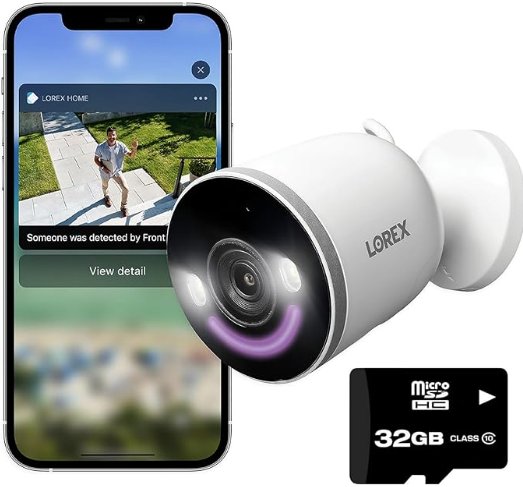
The storage on the Lorex 4K is solid, storing up to weeks of footage, with no subscriptions! The app is seamless and easy to use. The camera is very easy to install (see the video below). And for the techies, it’s compatible with Alexa and Google Home. The Lorex 4K also has a setting where a bright LED turns on when motion is detected, which does a lot of the deterring for you.
The whole install is in this video:
If you want the Lorex specifically, Lorex says this camera keeps recordings on the included 32GB microSD card with no monthly fees. It’s currently unavailable on Amazon.com. I bought mine in-store at Costco, or check Lorex directly.
Setup and placement tips for Airbnb
Point cameras at the ways in (driveway, front door, parking) and keep them away from windows, bedrooms, bathrooms and private outdoor areas. Then list every camera in your Airbnb listing before guests book.
- Cover entrances only. Driveway, front entry, side gate, parking pad. That’s what you need for cars, packages and party checks.
- Check the view from the app. If a camera can see into the house through a window, re-aim it or use the app’s privacy zones to black that part out.
- Never near sleeping or bathroom areas, and not over a hot tub, enclosed outdoor shower or sauna.
- Mount high and out of reach, under a soffit if you can, so rain and curious guests stay off the lens.
- Put the camera on your own Wi-Fi network (or a separate one from guest Wi-Fi) and turn on two-step login in the app.
- Disclose it. Add each camera’s location under Guest safety, and mention it in your house manual too.
- Use a good card. A high-endurance microSD card lasts longer with constant recording.
Install supplies
You need a drill, the right screws for your wall or soffit, and a nut driver bit for hex-head screws. Everything else comes in the camera box.
For the DIY-ers, here is a simple list of supplies you may need for the install. Personally, I can almost always justify buying new tools for a job if the tool cost is about what I would pay for someone else to do the job for me (even if I think I might never need the tool again, but that’s just me).
Cordless drill
Drill is easiest, and is essential if you want to secure to aluminum soffits with self tapping screws as I did.
DEWALT 20V Max compact drill (DCD771C2)Ratcheting multi-bit screwdriver
For the mounting plate and tight spots where the drill won’t fit. Bits live in the handle.
Klein Tools 32305 15-in-1 ratcheting screwdriverSelf-tapping screws
My camera came with screws and fasteners!!! But it didn’t have self tapping screws. These are required for securing to metal surfaces like I did in the video.
Stainless #8/#10 self-drilling screw kitMagnetic nut driver bits
Hex bits/heads for the self-tapping screws, so they drive straight without stripping.
SEDY 12-piece magnetic nut driver setShoe Goo
Ok, so pretty much my favorite around-the-house product of all time! It is slightly flexible, highly durable, clear, and waterproof, and binds to all materials exceptionally well. Epoxy is good, but it isn’t great for binding plastic to plastic like I demonstrated with the deflector I installed on the backyard security camera. Each tube pays for itself many times over. Love this stuff.
Shoe Goo clear adhesiveFAQ
Why should an Airbnb host get a security camera with an app?
So you can manage the rental remotely: see arrivals and departures, catch parties or extra guests, watch for deliveries and contractors, and check on the place while you’re away. Pick one that records locally so there’s no monthly fee.
What are the best security cameras for Airbnb?
Outdoor cameras that record locally with no subscription, like the Tapo C520WS (plug-in) or the Tapo C425 (battery). Put them on entrances only and disclose them in your listing.
Can Airbnb hosts have security cameras?
Yes, but only outside, and you have to disclose each camera’s location in your listing before guests book. Indoor cameras are banned, even if they’re turned off, and hidden cameras are never allowed.
Do I need to disclose a doorbell camera?
Yes. Airbnb counts doorbell cameras as recording devices, so list them under Guest safety like any other exterior camera.
What security cameras work without a subscription?
Look for cameras that record to a microSD card or a home base and give you free playback and alerts. Tapo, Lorex, Reolink and eufy all sell cameras like this.
Can Lorex cameras work without a subscription?
Yes. My Lorex 4K Wi-Fi camera records to a microSD card with no monthly fee, and I watch it from the Lorex app. Check the storage details on any specific model before you buy.
Can you use a Google Nest camera without a subscription?
Yes, but without Google Home Premium you only get about 3 hours of event video history. That’s fine for a quick check, but not if you need to see what happened last weekend between two guest stays.
What is the best wireless security camera system with remote viewing?
For a rental, pick cameras that all work in one free app. Both Tapo picks above use the same app, so you can watch live and play back clips from anywhere with an internet connection.
Can I use a noise monitor inside my Airbnb?
Yes, as long as it only measures decibel levels without recording audio, isn’t in a bedroom, bathroom or sleeping area, and you disclose that you have one.
Get my free host toolkit
Printable septic signs, the room-by-room cleaning checklist I give my cleaner, and occasional hosting tips by email.
Attention Airbnb or VRBO owners!
Liking what you are seeing?! Grab my free septic bathroom sign. This printable and frameable sign could save you thousands in septic bills. And here’s my free Airbnb cleaning checklist.
Want to get started on Airbnb? Use my referral link (I may earn a referral reward).